Blog

A More Capable Export Feature and Some Nifty Improvements! [Product Update 3.35]


We are excited to announce the latest version of EasyMedStat, packed with new features and improvements designed to make your clinical research processes smoother and more efficient. This update brings big enhancements to our data export capabilities, collaboration tools, category management, and eCRF viewing options. Let's dive into what's new and how these features can benefit you and your team.


Revamped Export Data Page


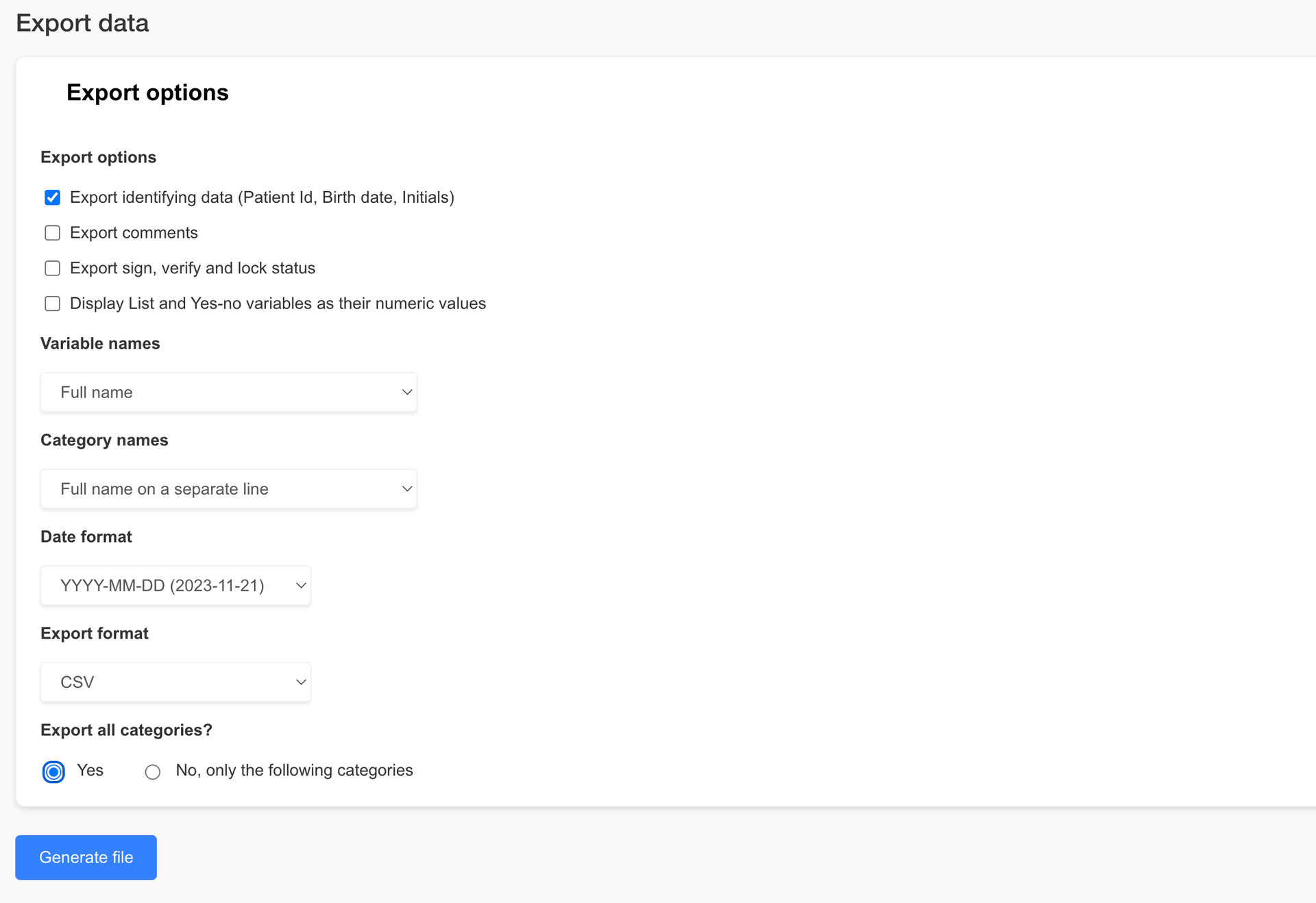
Exporting data is now easier and more versatile than ever. Check out the new features on our revamped Export Data page:


- Enhanced Export Options: Whether you need the entire dataset or just a specific part, our new options allow you to export exactly what you need. This helps keep file sizes manageable and your data focused.

- Excel Format Export: You asked, and we listened! You can now export your data in Excel format (.xlsx), making it super easy to work with in your favorite spreadsheet software.

- Pseudonymization: Protect patient privacy by exporting pseudonymized data. It's a great way to ensure data security while still getting the insights you need.

- R-Compatible Exports: If you use statistical software like R, you'll love our new export options. Now you can export coded values and variable names without spaces or special characters, making data import into R a breeze.


Share with Collaborators Page Update


Collaborating with your team just got simpler with our updated Share with Collaborators page:

Select All Option: Need to assign permissions to a collaborator quickly? The new "Select All" option lets you do just that, saving you time and hassle.


Revamped Category Picker


Managing categories is now more intuitive thanks to our revamped Category Picker:


- Hierarchical Display: Easily navigate through categories with a clear, expandable tree structure.

- Select All and Search Functionality: Quickly select all categories or find specific ones using the search bar. Real-time filtering and a selection count display make managing categories a snap.


Enhanced Viewing Capabilities for Users with "View Patient" Permission


We’ve boosted the viewing capabilities for users with "View patient" permission to enhance monitoring and data access:


- View and Download Files and Pictures: Users with "View patient" permission can now see and download pictures and files directly from eCRF v2.

- Streamlined Interface for Non-Editors: For users without "Edit patient" permission, we’ve streamlined the interface by removing editing options while keeping full viewing functionality.


Conclusion


These nifty new features and improvements are designed to make EasyMedStat more powerful and user-friendly. We’re confident these updates will help you collect, analyze, and share your data more efficiently and securely. We can’t wait to see how you use these tools to advance your research and improve patient outcomes.


Stay tuned for more updates, and as always, we love hearing your feedback. Thanks for choosing EasyMedStat as your go-to platform for clinical research!


LATEST POSTS

By Anne-Carolyn Garabedian December 3, 2025
New on EasyMedStat: competing risks in survival analysis with the Aalen–Johansen method and Gray’s test. Compare your groups with customizable exports.
By Anne-Carolyn Garabedian December 3, 2025
Nouveau sur EasyMedStat : risques compétitifs en analyse de survie avec méthode Aalen-Johansen et test de Gray. Comparez vos groupes avec des exports personnalisés.
By Anne-Carolyn Garabedian November 26, 2025
Discover EasyMedStat 4, the latest version that transforms clinical monitoring by centralizing patient management, simplifying data monitoring, and improving the quality of information. Save time, reduce errors, and facilitate cooperation among your teams.
By Anne-Carolyn Garabedian November 26, 2025
Découvrez EasyMedStat 4, la dernière version qui transforme le suivi clinique en centralisant la gestion des patients, en simplifiant le monitoring des données et en améliorant la qualité des informations. Économisez du temps, diminuez les erreurs et facilitez la coopération de vos équipes.
By Mikael Chelli March 19, 2025
Nous sommes ravis de vous présenter la version 3.40 d’EasyMedStat, qui apporte deux améliorations majeures pour simplifier la gestion des questionnaires électroniques (ePRO) et améliorer l’expérience des patients. πŸ”„ Reprendre un questionnaire là où on l’a laissé Les questionnaires longs peuvent être fastidieux à remplir d’un seul coup. Désormais, lorsqu’un patient interrompt un questionnaire, il pourra le reprendre directement à la dernière question complétée . βœ… Gain de temps : plus besoin de recommencer depuis le début. βœ… Confidentialité préservée : les réponses précédentes ne sont pas affichées si quelqu’un d’autre reprend le questionnaire. βœ… Suivi amélioré : un questionnaire terminé passe en statut "Complété", tandis qu’un questionnaire inachevé reste en "Partiellement complété". πŸ› οΈ Une meilleure gestion des questionnaires vides Les questionnaires envoyés aux patients sont désormais plus intelligents : βœ… Fini les intros et outros inutiles pour les sections vides. βœ… Un questionnaire sans question ne sera pas envoyé , évitant ainsi des envois inutiles. βœ… Vérification en temps réel avant l’envoi, pour s’assurer que le questionnaire contient bien des données pertinentes. βœ… Transparence totale : si un questionnaire est annulé car vide, son statut "ANNULÉ" est affiché avec une explication. ο»Ώ πŸš€ Vers une expérience plus fluide et efficace Avec cette mise à jour, nous faisons un pas de plus vers une gestion plus intuitive et automatisée des questionnaires ePRO. Moins de perte de temps, plus de pertinence, et une meilleure expérience pour tous !
By Mikael Chelli March 19, 2025
We are excited to introduce version 3.40 of EasyMedStat, bringing two major improvements to streamline electronic patient-reported outcomes (ePRO) and enhance the patient experience. πŸ”„ Resume a Questionnaire from Where You Left Off Long questionnaires can be challenging to complete in one sitting. Now, if a patient stops answering a questionnaire, they can resume right from the last completed question . βœ… Saves time : No need to start over from the beginning. βœ… Ensures privacy : Previous answers are not displayed if someone else resumes the questionnaire. βœ… Improved tracking : A completed questionnaire is marked as "Completed", while an unfinished one remains "Partially completed". πŸ› οΈ Smarter Handling of Empty Questionnaires Questionnaires sent to patients are now more intelligent: βœ… No more unnecessary intros and outros for empty sections. βœ… A questionnaire without any questions will not be sent , avoiding irrelevant emails. βœ… Real-time verification before sending ensures the questionnaire contains relevant data. βœ… Full transparency : If a questionnaire is canceled because it’s empty, its status is marked as "CANCELED", with an explanation. πŸš€ Towards a More Seamless and Efficient Experience With this update, we take another step toward a more intuitive and automated ePRO management system. Less wasted time, more relevant data, and a better experience for everyone!
February 18, 2025
Quoi de neuf ? Auparavant, il n'était possible de signer, vérifier ou verrouiller (SVL) qu’un formulaire patient entier. Désormais, vous avez plus de flexibilité ! Vous pouvez : βœ… Signer, vérifier ou verrouiller des catégories individuelles (ex : une visite spécifique) βœ… Signer, vérifier ou verrouiller des variables individuelles (ex : un seul point de données) Cela signifie que les moniteurs et les chercheurs n'ont plus besoin d'attendre la fin du formulaire patient pour valider les données. Vous pouvez maintenant vérifier et approuver les informations au fur et à mesure qu'elles sont saisies ! Pourquoi est-ce utile ? πŸ”Ή Validation des données plus rapide et plus précise – Validez les informations progressivement, sans attendre la fin du formulaire patient. πŸ”Ή Meilleur suivi et traçabilité – Chaque action (signer, vérifier, verrouiller) est horodatée et enregistrée . πŸ”Ή Intégrité des données renforcée – Verrouillez des points de données critiques ou des visites pour éviter toute modification non souhaitée. Comment ça fonctionne ? 1️⃣ Activer le SVL par Catégorie ou par Variable Allez dans Paramètres de la série > Monitoring Activez "Autoriser la signature, la vérification et le verrouillage par catégorie" ou "Autoriser la signature, la vérification et le verrouillage par variable" Ces options sont désactivées par défaut 2️⃣ Nouvelles icônes pour chaque catégorie et variable Si l'option est activée, vous verrez trois nouveaux icônes (Signer βœ…, Vérifier βœ”οΈ, Verrouiller πŸ”’) sur chaque catégorie et variable. Cliquez sur une icône pour signer, vérifier ou verrouiller les données correspondantes. 3️⃣ Sécurité & Audit Trail Une fenêtre de confirmation apparaît pour la signature et la vérification (pas pour le verrouillage). Vous devez entrer votre mot de passe pour confirmer. Toutes les actions sont enregistrées dans l'audit trail pour une traçabilité complète. 4️⃣ Permissions & Visibilité Seuls les utilisateurs ayant les autorisations de signature, de vérification ou de verrouillage peuvent effectuer ces actions. Tous les utilisateurs ayant accès au formulaire patient peuvent voir les statuts SVL. À noter πŸ”Έ Une variable ou une catégorie verrouillée ne peut pas être modifiée via l'API ou l'ePRO πŸ”Έ Supprimer et restaurer un patient conserve les statuts SVL πŸ”Έ Les statuts SVL des patients, des catégories et des variables sont indépendants (ex : déverrouiller un patient ne déverrouille pas une catégorie ou une variable) Qui peut utiliser cette fonctionnalité ? Disponible pour tous les plans payants et les essais gratuits Peut être activée dans toute étude où le SVL par catégorie/variable est activé ο»Ώ πŸš€ Cette nouvelle fonctionnalité rend le monitoring plus efficace et structuré, garantissant une meilleure conformité et une fiabilité accrue des données en recherche clinique !
By Mikael Chelli February 18, 2025
What’s new? Previously, you could only Sign, Verify, or Lock (SVL) an entire patient form at once. Now, you have more flexibility ! You can: βœ… Sign, verify, or lock individual categories (e.g., a specific visit) βœ… Sign, verify, or lock individual variables (e.g., a single data point) This means monitors and researchers no longer have to wait until the entire patient form is complete to start validating data. You can now review and confirm data as it becomes available ! Why is this useful? πŸ”Ή Faster and more precise data validation – Approve data progressively instead of waiting for the full patient form. πŸ”Ή Better tracking and accountability – Each signed, verified, or locked variable/category is timestamped and logged. πŸ”Ή Stronger data integrity – Lock critical data points or visits to prevent unintended changes. How does it work? 1️⃣ Enable SVL per Category or Variable Go to Series Settings > Monitoring Activate "Allow sign, verify, and lock for each category" or "Allow sign, verify, and lock for each variable" These settings are OFF by default 2️⃣ New Icons for Each Category & Variable When enabled, you’ll see three new icons (Sign βœ…, Verify βœ”οΈ, Lock πŸ”’) on each category and variable. Click an icon to sign, verify, or lock the corresponding data. 3️⃣ Security & Audit Trail A confirmation popup will appear when signing or verifying (not when locking). You must enter your password to confirm. All actions are logged in the audit trail for full traceability. 4️⃣ Permissions & Visibility Only users with Sign, Verify, or Lock permissions can perform these actions. All users with access to the patient form can see SVL statuses. Important Notes πŸ”Έ Locking a variable or category prevents changes via API and ePRO πŸ”Έ Deleting and restoring a patient keeps SVL statuses intact πŸ”Έ SVL for patients, categories, and variables are independent (e.g., unlocking a patient won’t unlock a category or variable) Who can use this feature? Available to all paid plans and free trials Can be used in any study where SVL per category/variable is enabled ο»Ώ πŸš€ This feature makes data monitoring more efficient and structured, ensuring better compliance and reliability in clinical research!
By Mikael Chelli September 30, 2024
Dans le cadre d’un essai clinique, chaque inclusion de patient ou déclaration d’événement indésirable représente un moment clé nécessitant une vigilance accrue. Chez EasyMedStat, nous avons à cœur de vous aider à optimiser vos processus en introduisant une nouvelle fonctionnalité : les Monitoring Automations. Pourquoi cette fonctionnalité est-elle importante ? Gérer plusieurs études cliniques simultanément peut être complexe. Dans ce contexte, il est facile de passer à côté d’une information essentielle, comme l’inclusion d’un nouveau patient ou la déclaration d’un événement indésirable. Grâce à notre nouvelle fonctionnalité, vous pouvez automatiser des notifications par email dès qu’un patient est inclus ou qu’un événement indésirable est déclaré, vous permettant ainsi de gagner en réactivité tout en évitant les erreurs humaines. Comment cela fonctionne-t-il ? L’Automatisation de Monitoring repose sur un principe simple : vous définissez une action qui est automatiquement déclenchée par un événement spécifique, comme l’inclusion d’un patient ou la déclaration d’un événement indésirable. Prenons deux exemples d’utilisation : Inclusion d’un nouveau patient : Lorsque l’inclusion d’un nouveau patient est validée dans votre eCRF, un email est automatiquement envoyé à l’équipe de recherche clinique. Vous pouvez personnaliser ce message avec des variables liées au patient, à l’utilisateur ou encore au site d’inclusion, ce qui permet de contextualiser l’email selon vos besoins spécifiques. Déclaration d’un événement indésirable : Lorsqu’un événement indésirable est déclaré, un email peut être envoyé à l’équipe des affaires réglementaires. Il est également possible de définir une condition basée sur la gravité de l’événement. Par exemple, seuls les événements graves peuvent déclencher une notification. Un gain de temps précieux pour vos équipes Les Automatisations de Monitoring offrent une souplesse incroyable. Au lieu de devoir constamment vérifier manuellement les inclusions et les événements dans vos différentes études, vous pouvez désormais compter sur ces notifications automatiques qui vous tiendront informé en temps réel. Cette fonctionnalité permet non seulement d’améliorer la réactivité de vos équipes, mais aussi d’éviter des oublis ou des retards dans le traitement des données critiques. Personnalisation et souplesse d’utilisation L’un des grands avantages de cette fonctionnalité réside dans sa personnalisation. Que ce soit pour l’objet du message, le contenu de l’email ou encore les destinataires, tout peut être adapté à vos besoins. Vous pouvez insérer des variables liées aux patients (comme la date d’inclusion, l’identifiant du patient) ou aux utilisateurs (nom, prénom), afin que chaque notification contienne des informations pertinentes. De plus, il est possible de configurer des notifications spécifiques à un ou plusieurs sites , en fonction de la configuration de votre étude. Par exemple, vous pouvez choisir de recevoir des notifications uniquement pour des inclusions effectuées sur certains centres. ο»Ώ Conclusion Avec cette nouvelle fonctionnalité, EasyMedStat franchit une nouvelle étape dans l’accompagnement des équipes de recherche clinique. En automatisant des tâches essentielles comme les notifications d’inclusion ou d’événements indésirables, vous améliorez à la fois l'efficacité et la sécurité de vos essais. N’attendez plus pour découvrir et tester les Automatisations de Monitoring sur votre interface EasyMedStat ! Restez connecté, réactif, et concentrez-vous sur l’essentiel : la réussite de vos études cliniques.
By Mikael Chelli September 30, 2024
In clinical trials, each patient inclusion or adverse event declaration represents a key moment that requires heightened attention. At EasyMedStat, we are committed to helping you optimize your processes by introducing a new feature: Monitoring Automations. Why is this feature important? Managing multiple clinical studies simultaneously can be challenging. In such a context, it’s easy to miss critical information, such as the inclusion of a new patient or the declaration of an adverse event. With our new feature, you can automate email notifications as soon as a patient is included or an adverse event is declared. This allows you to react quickly while avoiding human errors. How does it work? Monitoring Automation is based on a simple principle: you define an action that is automatically triggered by a specific event, such as patient inclusion or an adverse event declaration. Let’s look at two use cases: Inclusion of a new patient: When the inclusion of a new patient is validated in your eCRF, an email is automatically sent to the clinical research team. You can customize this message with variables related to the patient, the user, or the inclusion site, allowing the email to be contextualized according to your specific needs. Adverse event declaration: When an adverse event is declared, an email can be sent to the regulatory affairs team. It is also possible to set a condition based on the severity of the event. For example, only serious adverse events can trigger a notification. A valuable time-saver for your teams Monitoring Automations offer incredible flexibility. Instead of constantly checking inclusions and events across your various studies manually, you can now rely on these automatic notifications to keep you informed in real time. This feature not only improves the responsiveness of your teams but also helps avoid oversight or delays in processing critical data. Customization and flexibility One of the main advantages of this feature lies in its customization. Whether it’s the email subject, content, or recipients, everything can be tailored to your needs. You can insert variables related to patients (such as inclusion date, patient ID) or users (first name, last name), ensuring that each notification contains relevant information. Additionally, it is possible to configure notifications specific to one or more sites , depending on the setup of your study. For example, you can choose to receive notifications only for inclusions made at certain centers. Conclusion With this new feature, EasyMedStat takes another step forward in supporting clinical research teams. By automating essential tasks such as notifications for patient inclusion or adverse events, you enhance both the efficiency and safety of your trials. Don’t wait to explore and test Monitoring Automations in your EasyMedStat interface! Stay connected, stay responsive, and focus on what matters most: the success of your clinical trials.
Show More

Let your friends know!