EasyMedStat 4.10: Exporting the Audit Trail as Excel files for offline review, and three fixes to ePRO questionnaires
Research teams asked us for a way to review a study's history outside the eCRF: this release adds the Audit Trail export, and fixes three issues with ePRO questionnaires.
Audit Trail: Export a study's history to review it offline
Data managers need to be able to examine a study's history without being connected to the platform, for example for an internal review or to prepare for an audit. From the Data Manager page, you can now open the Audit Trail page and export its content as files.

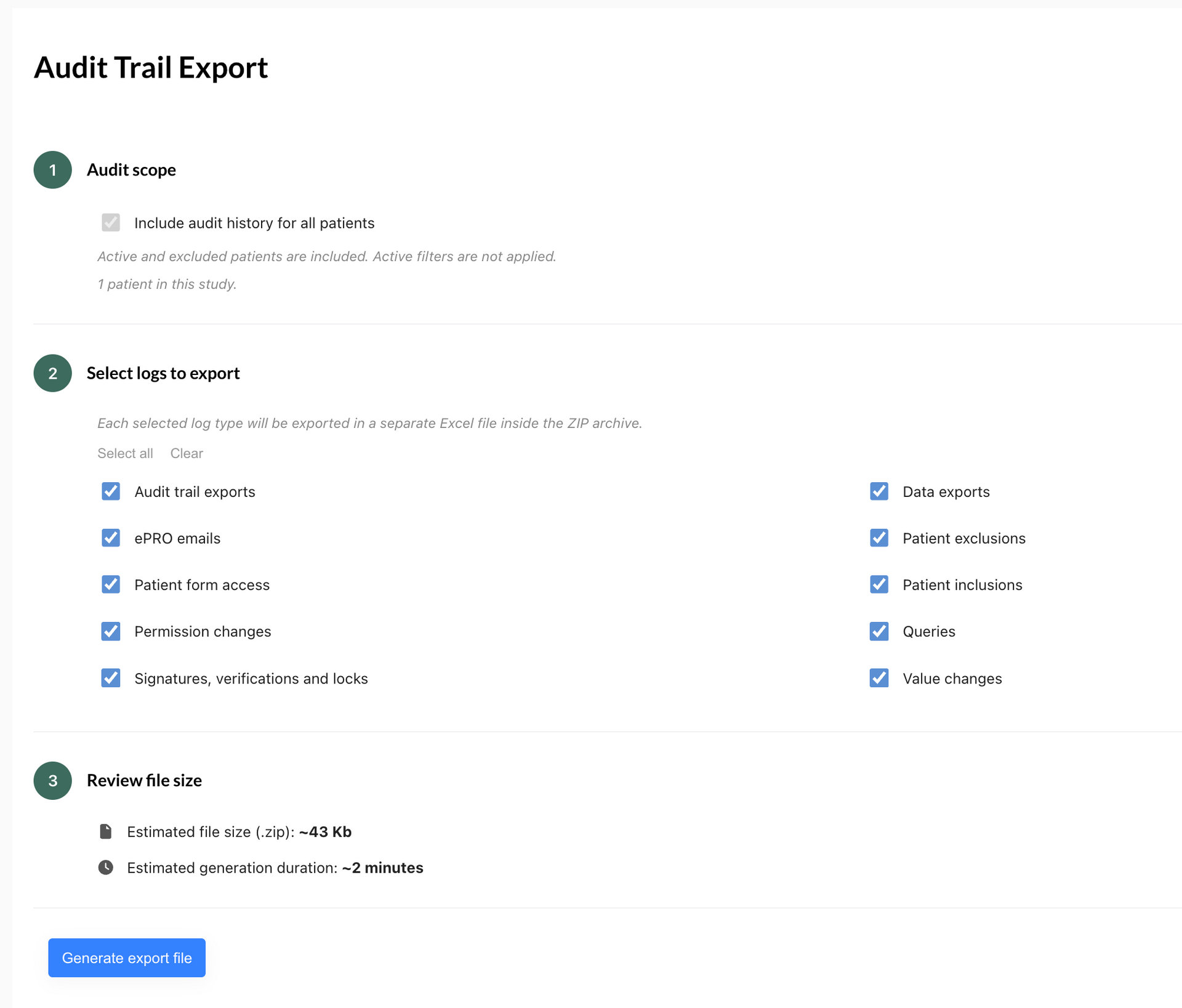
You choose the log types to export, start the generation, then receive an email when the file is ready:
- Open the Audit Trail page from the Data Manager page.
- Choose the log types to export: Patient inclusions, Patient exclusions, Value changes, Signatures, verifications and locks, Patient form access, Queries, Permission changes, Data exports, Audit trail exports, ePRO emails. All are selected by default.
- Check an approximate estimate of the file size and generation time before clicking "Generate export file"
- Receive an email containing a download link (valid for 48 hours) when the export is ready, or an email telling you that the export has failed.
- Get one Excel file per selected log type, grouped in a .zip file. The .zip also contains a .txt metadata file: study name, study identifier, user, date and time of generation, selected log types, number of patients and active filters (No).
- Identify patients by their custom record identifier when one is defined, otherwise by the system patient identifier.
Only the study creator can export the Audit Trail
Other users cannot generate an export. If your account is on an expired or unpaid free trial, you can still open the page and generate an export.
No export is possible for a deleted study.
All the study's patients are always included, including inactive or deleted patients. The page displays a fixed "Export all patients data" option.
Active filters are not applied, and you can neither select patients nor export only the filtered patients. This is a deliberate choice: we want an Audit Trail export to always be complete.
A few additional rules:
- Each log type is exported to its own Excel file. The files are always delivered in a .zip, even when only one log type is selected.
- If you already have a pending or running export, the page asks you to wait for it to finish before requesting another, and shows the time of your last request.
- If the study uses randomisation and you do not have permission to see the randomisation groups, the group is replaced with "blinded" in the export.
- The generation of an export is itself recorded in the Audit Trail: user, date and time, study, selected log types, number of patients included and, if available, the status of the export task.
Fixes and improvements
- Variable description images now display correctly when a questionnaire is opened.
- Previewing an ePRO questionnaire no longer fails with an error message in some cases.
- When editing an ePRO questionnaire via a public link, the patient is no longer asked to enter their date of birth again.
Share this article